Postingan

Cool Breadcrumbs Navigation

Gambar
A breadcrumb navigation allow users to know where they are in a hierarchical structure and navigate back to higher-level pages in the hierarchy. Also, the breadcrumbs can reduce the number of actions a user need to perform in order to navigate back. So, to keep it simple, if you have a website with lot of pages and sub-levels, in order to increase usability, you need to use breadcrumbs. Having said that, today you’ll learn how to create your own cool CSS3 breadcrumbs. The HTML Tha markup is simple and minimal, based on an unordered list. <ul id = "breadcrumbs-one" > <li><a href = "" > Lorem ipsum </a></li> <li><a href = "" > Vivamus nisi eros </a></li> <li><a href = "" > Nulla sed lorem risus </a></li> <li><a href = "" > Nam iaculis commodo </a></li> <li><a href = "" class = "current...
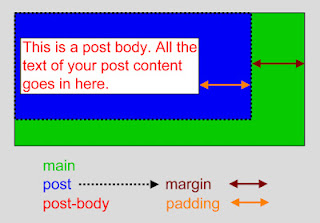
Blogspot Template Elements

Gambar
The #main and .post are the titles of each containers. Each container codes must be contained within {...} . For the explanation below, we'll focus on the codes inside the post block, especially for the explanation on the margin and padding (the codes colored in red ). Margin - sets the distance between the border of the container to the border of a parent (larger) container outside it. There are 4 numbers defining the Margin property. The 1st number sets the top margin, the 2nd sets the right margin, the 3rd number sets the bottom margin, and the 4th number sets the left margin. It basically sets the whole margin in a clock-wise fashion starting from the top. In the case above, the parent container for the post container is the main container. See how the dashed border for the blue ( post ) container is placed inside the green ( main ) container following the post block's margin command (the codes in red). If the post 's margins are all set to zero, then th...

CSS External

When using CSS it is preferable to keep the CSS separate from your HTML. Placing CSS in a separate file allows the web designer to completely differentiate between content (HTML) and design (CSS). External CSS is a file that contains only CSS code and is saved with a ".css" file extension. This CSS file is then referenced in your HTML using the instead of Let us get started by making that external CSS file. Open up notepad or any other plain text editor and type the following CSS code. CSS Code: body{ background-color: gray;} p { color: blue; } h3{ color: white; }   Now save the file as a CSS (.css) file. Make sure that you are not saving it as a text (.txt) file, as notepad likes to do by default. Name the file "test.css" (without the quotes). Now create a new HTML file and fill it with the following code. HTML Code: <html> <head> <link rel="stylesheet" type="text/css" href="test.css" /> ...